Product Support

Customer-driven Improvement
AxCent has been continuously improved with annual releases since 1983. Nearly two hundred licenses shared by nearly four hundred users worldwide make AxCent the most mature and robust turbomachinery design software available today. Each year, the most requested features from Concepts NREC’s formal ballot process are incorporated into the new AxCent release.

Technical Support
Our support staff in North America, Europe, and the Far East includes experienced turbomachinery designers. Our software maintenance plan, Agile Products Support (APS), features traditional software upgrades, a help line, and regular design reviews conducted by our engineering staff, who also teaches our renowned turbomachinery courses.

Documentation
Documentation features make AxCent easy to use and include comprehensive HTML HELP plus step-by-step tutorials. User guides for designing radial and axial machines include Designing Axial Machines With AxCent and Designing Radial Machines With AxCent. Both guides are available in print or in searchable PDF format.
Multi-Stage Turbine Design
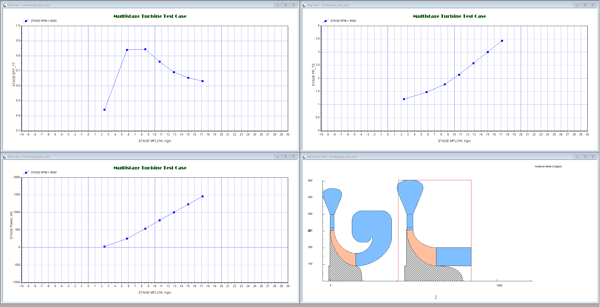
The diversification of radial turbine applications and the need to use a broader set of real fluids in those applications is driving the need to design to pressure ratios that necessitate multiple stages of expansion. GOOD NEWS: RITAL is now capable of modeling multi-stage designs! By integrating our AXIAL solver, which is not specific to axial machines, and implementing a hood connection model between the stages, a designer is now able to create multi-stage radial turbine designs to achieve pressure ratios never before possible with this meanline design tool.
RITAL Brochure
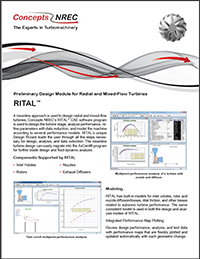
A meanline approach is used to design radial and mixed-flow turbines, Concepts NREC’s RITAL™ CAE software program is used to design the turbine stage, analyze performance, refine parameters with data reduction, and model the machine according to several performance models. RITAL’s unique Design Wizard leads the user through all the steps necessary for design, analysis, and data reduction. The meanline turbine design can easily migrate into the AxCent® program
for further blade design and fluid dynamic analysis.